
Software Offline
159.8 MB
Virus-Free Verified
PDF Toolkit Pro Free
OS: Windows • Published: Sep 10, 2026 • 21 downloads
In-content Ad
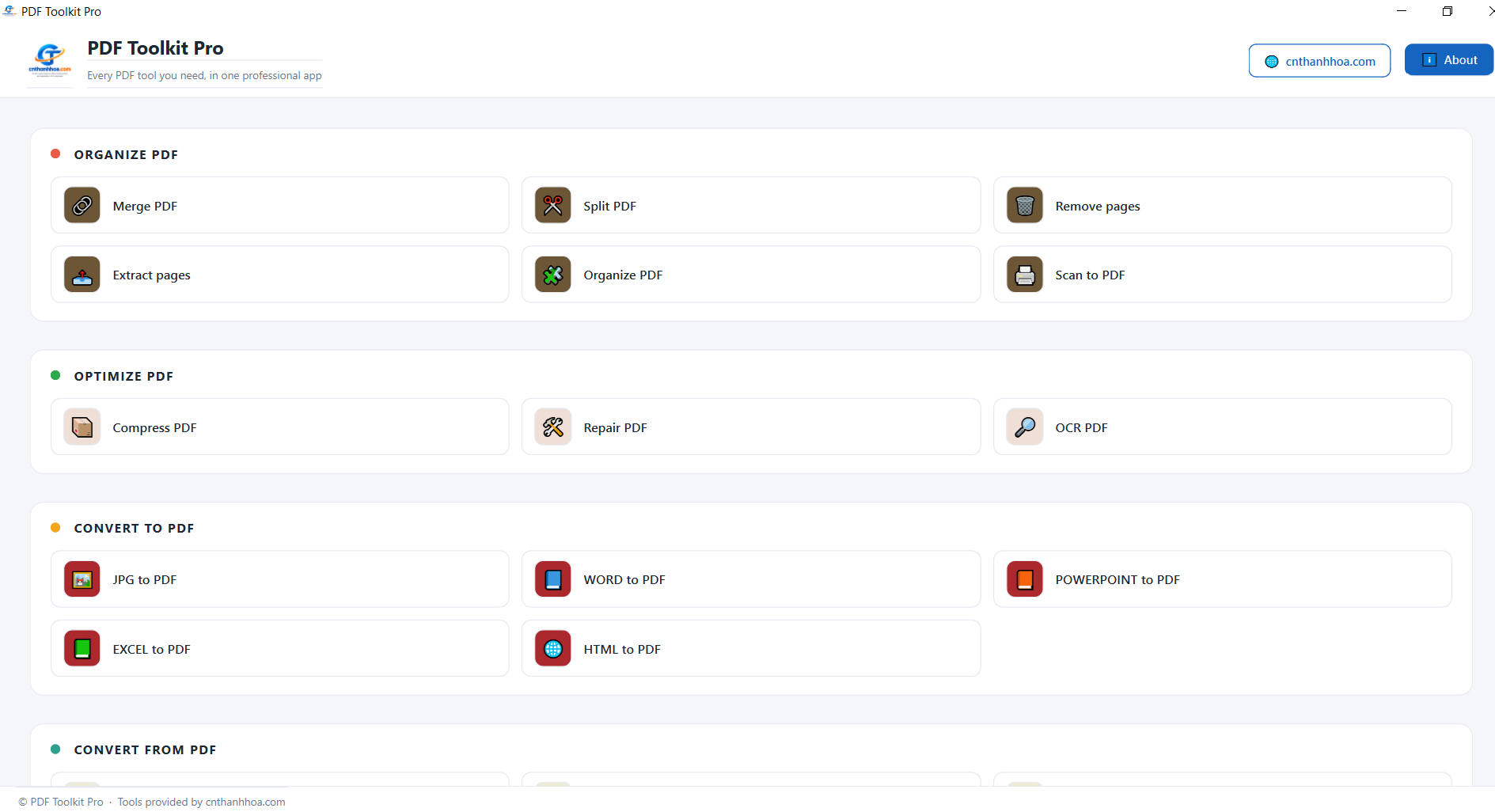
Software Screenshots & Interface Preview
Detailed Description
PDF Toolkit Pro Free is an easy-to-use all-in-one PDF toolkit designed to help you manage, edit, convert, optimize, and secure PDF documents quickly and efficiently. With a clean and intuitive interface, you can perform common PDF tasks without needing multiple separate applications.
Whether you need to merge PDF files, split PDF documents, compress PDFs, convert files to and from PDF, edit PDF pages, or protect your documents, PDF Toolkit Pro Free brings essential PDF tools together in one convenient application.
Powerful PDF Tools in One Application
Organize PDF
Manage your PDF pages with simple and practical tools:
Merge PDF – Combine multiple PDF files into a single document.
Split PDF – Split a PDF into separate files or selected pages.
Remove Pages – Delete unwanted pages from a PDF document.
Extract Pages – Extract specific pages and save them as a new PDF.
Organize PDF – Rearrange and manage PDF pages.
Scan to PDF – Create PDF documents from scanned content.
Optimize PDF
Improve the quality and usability of your PDF documents:
Compress PDF – Reduce PDF file size for easier storage and sharing.
Repair PDF – Attempt to repair damaged or problematic PDF files.
OCR PDF – Recognize text from scanned PDF documents and make it searchable.
Convert Files to PDF
Convert popular document and image formats into PDF:
JPG to PDF
Word to PDF
PowerPoint to PDF
Excel to PDF
HTML to PDF
Create professional PDF documents from your existing files quickly and easily.
Convert PDF to Other Formats
Extract content from PDF files and convert them into commonly used formats:
PDF to JPG – Convert PDF pages into JPG images.
PDF to Word – Convert PDF content into editable Word documents.
PDF to PowerPoint – Convert PDF content for presentation editing.
PDF to Excel – Convert PDF tables and data into Excel.
PDF to PDF/A – Create PDF/A documents for long-term document archiving.
Edit PDF
Make quick changes to your PDF documents with built-in editing tools:
Rotate PDF – Rotate individual pages or entire PDF documents.
Add Page Numbers – Insert page numbers into PDF files.
Add Watermark – Add text or image watermarks to protect or identify documents.
Crop PDF – Remove unwanted margins and crop PDF pages.
Edit PDF – Make changes to PDF content.
PDF Forms – Work with PDF forms and form fields.
PDF Security
Protect and manage sensitive PDF documents:
Unlock PDF – Remove restrictions from PDFs when you have the necessary authorization.
Protect PDF – Add password protection to PDF files.
Sign PDF – Add digital or electronic signatures to documents.
Redact PDF – Permanently hide sensitive information.
Compare PDF – Compare two PDF documents and identify differences.
Why Choose PDF Toolkit Pro Free?
PDF Toolkit Pro Free is designed as a practical PDF solution for everyday users, office workers, students, professionals, and anyone who frequently works with PDF documents.
Instead of installing several different PDF programs, you can access a wide range of essential PDF tools from one application.
Key benefits include:
All-in-one PDF toolkit
Simple and user-friendly interface
Fast PDF file management
PDF merging and splitting
PDF compression and optimization
PDF conversion tools
PDF editing tools
OCR support
PDF security and protection
PDF signing and redaction
PDF comparison
Useful tools for everyday office work
Work Smarter with PDF Toolkit Pro Free
From simple tasks such as combining PDF files and removing pages to more advanced operations such as OCR, PDF conversion, document protection, redaction, and PDF comparison, PDF Toolkit Pro Free provides the tools you need in one place.
Whether you are managing business documents, preparing reports, organizing scanned files, converting documents, or sharing PDFs online, PDF Toolkit Pro Free helps make your PDF workflow faster and more convenient.
PDF Toolkit Pro Free – Your complete PDF toolkit for managing, converting, editing, optimizing, and securing PDF documents.
Changelog & Version History
v1.0
2026-09-10